In-app bug reporting for the people using your mobile app
In-app bug reporting gives mobile app users a direct way to tell your team what went wrong without leaving the screen where it happened.
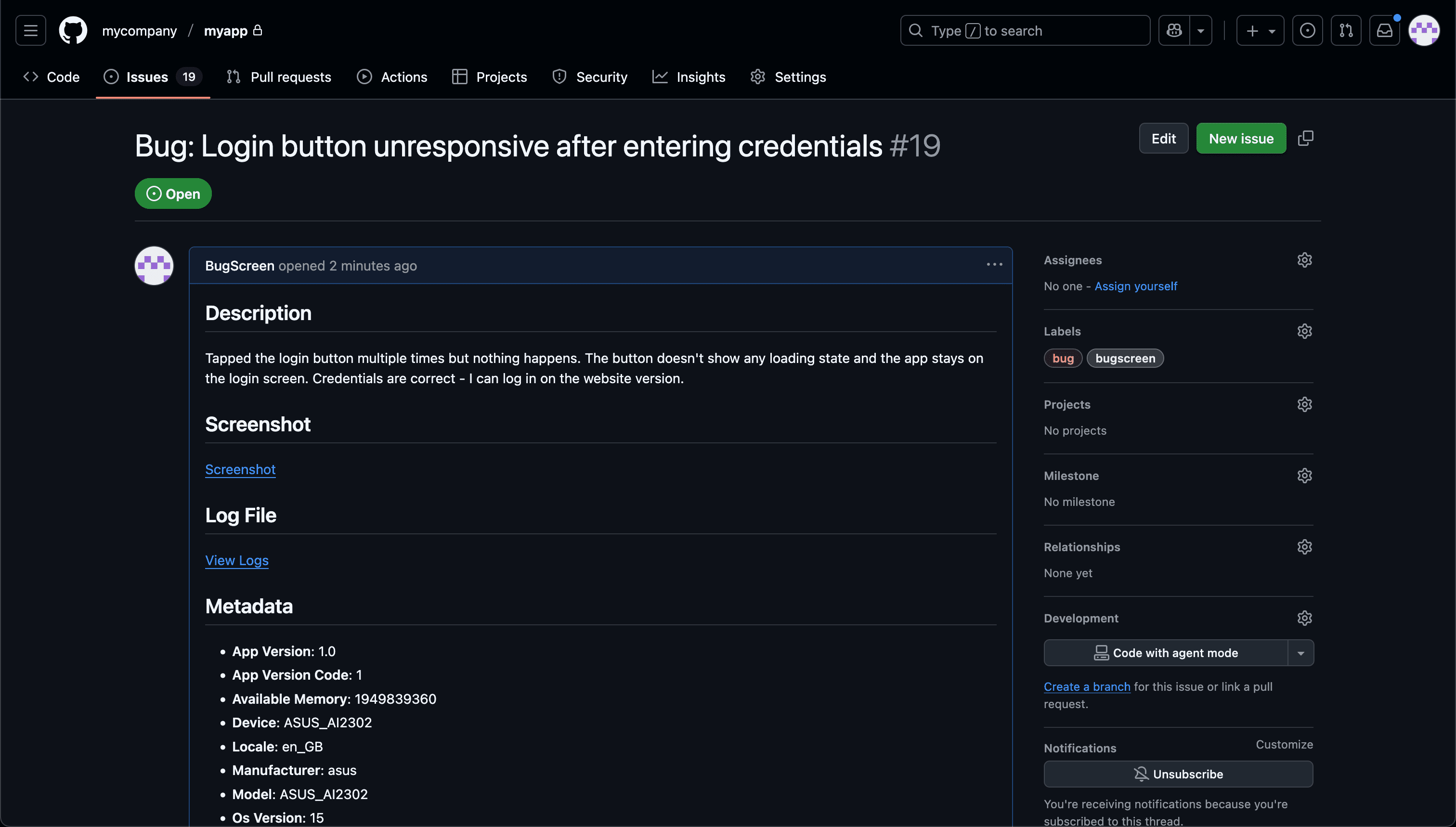
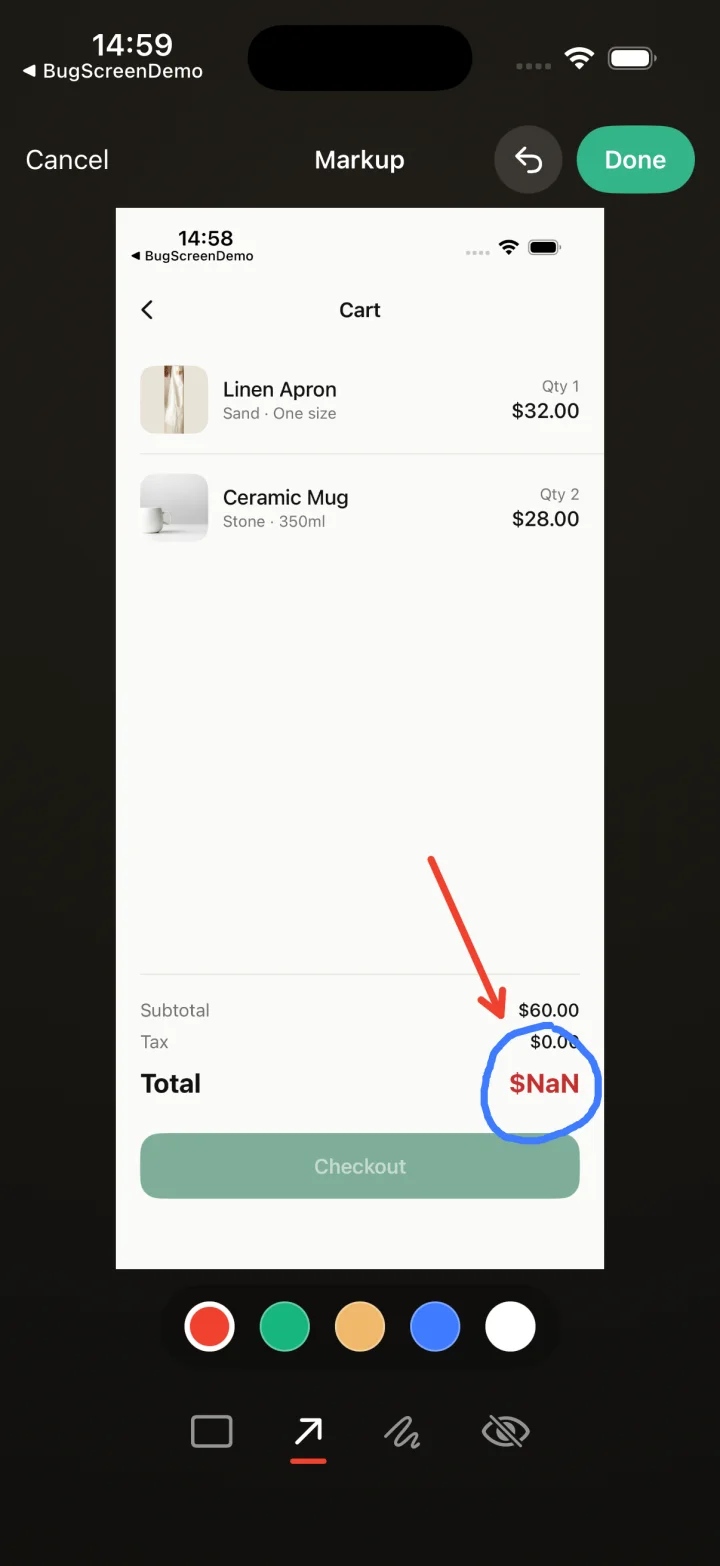
From in-app problem to engineering ticket.
- Step 1
The user opens your report action
Add a “Report a problem” action to Help, settings or any moment where a user may need it. BugScreen opens the native report form without sending them out of your app.
- Step 2
They explain and show the problem
The user adds a short description and can attach up to four screenshots, mark up the important detail and redact anything sensitive before submitting.
- Step 3
BugScreen delivers the report
The report carries its screenshot, app and device context and recent logs into Report Inbox and any connected tracker, ready for your product and engineering team to triage.
Capture the problem while it is still in front of them
BugScreen combines their description and screenshot with app and device context, then files the issue in the engineering tracker your team already uses.
A support email or App Store review usually arrives after the useful moment has passed. An in-app reporter lets the user describe the broken screen, confusing behaviour or incorrect result while they can still see it, giving your team a concrete observation instead of a memory reconstructed later.
Turn feedback into work without a copy-paste step
Accepted user reports appear immediately in the private Report Inbox. When an integration is connected, BugScreen also creates the tracker item directly so it can be labelled, prioritised and assigned alongside the rest of the product backlog.
Choose when reporting appears
Use BugScreen’s programmatic trigger behind a deliberate “Report a problem” action, or enable screenshot detection when that interaction suits your audience. The reporting entry point belongs to your app, so you can place it where users will understand what it does.
Keep surveys, telemetry and issue reports in their own lanes
Surveys measure sentiment and crash tools detect failures automatically. BugScreen handles the third signal: a person notices that something looks or behaves incorrectly and deliberately tells your team. Keeping those jobs separate makes each stream easier to act on.
Built for user-reported mobile issues.
The problem arrives with context
The user explains what they were trying to do while BugScreen adds the app version, device, OS, locale and recent application logs your team needs to investigate.
The user stays inside your app
Open the reporter from your own Help screen, settings menu or error state. Users do not have to switch to email, find a support form or learn an engineering tool.
Engineering stays in its tracker
Each submission becomes an issue in Jira, GitHub, ClickUp or Linear and can also notify Slack, so reports enter the workflow where fixes already happen.
Common questions
How is in-app bug reporting different from an in-app survey?
In-app bug reporting captures a specific problem a user has just encountered, along with evidence that helps engineering investigate it. A survey measures opinions, satisfaction or preferences across a group of users rather than documenting one fixable issue.
Does in-app bug reporting replace crash reporting?
No. Crash reporting detects exceptions, crashes and other failures the software can recognise automatically. In-app reporting captures visual, behavioural and account-specific problems that a person notices even when the app never crashes.
Can we open BugScreen from our own Help screen?
Yes. The iOS, Android and React Native SDKs expose a programmatic report action, so you can open BugScreen from a Help screen, settings menu, floating button or error state. Automatic screenshot detection can be switched off independently.
What context is included with a user report?
A report can include the user’s description and screenshots plus the device model, OS version, app version and build, locale, appearance, recent application logs and custom context supplied by your app.
Do users need BugScreen or issue-tracker accounts?
No. Users report through the form inside your app. BugScreen accepts the report for your team and can forward it through a configured integration, so the person reporting does not need access to BugScreen, Jira, GitHub, ClickUp, Linear or Slack.
Learn more about collecting mobile feedback
How to collect user feedback in a mobile appTry BugScreen on your app.
Screenshot → ticket in your issue tracker, with logs and device context. Free to start — no credit card.
Get started