Customise the bug reporter
Settings belong to one app and apply to every supported reporter connected to it.
Open reporter settings
Reporter settings are configured separately for each app:
- Open the Console.
- Select the app you want to change.
- Open the Reporter tab.
Customise wording
Open Wording to choose how your app asks for a report and thanks the person who sends it. For product feedback, use a title such as “Share your feedback” and a submit button such as “Send feedback”.
| Field | Default | Character limit |
|---|---|---|
| Reporter title | Report an issue | 60 |
| Description label | What happened? | 60 |
| Description placeholder | Describe the bug… | 160 |
| Type heading | Type | 60 |
| Submit button | Create ticket | 60 |
| Success title | Thanks! | 60 |
| Success message | Your report has been sent. | 160 |
The preview follows your draft as you edit. It shows the report form and its success acknowledgement. Native layouts vary by platform.
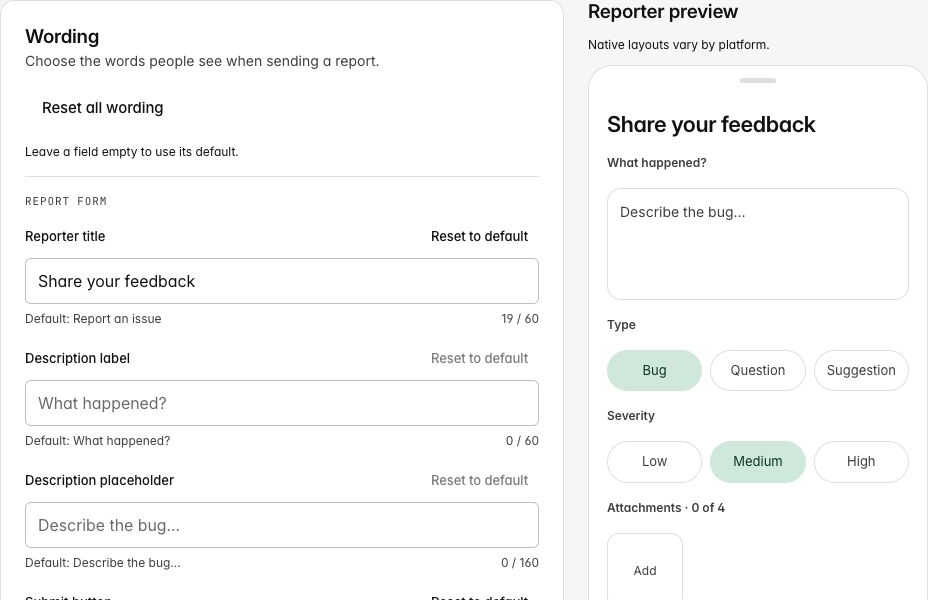
Leave a field empty or select Reset to default to use its default wording. Reset all wording restores all seven defaults while keeping your Type choices and Severity setting. Resets take effect when you select Save changes.
Use plain text within the displayed character limit. Formatting, links and placeholders are shown literally. In the Type section, Type heading changes the label above your choices; it does not change the choices themselves.
Customise Type
Type is a single-choice field for the kind of report a tester is filing. Replace the default choices with the language your team already uses — for example Bug, Question and Suggestion.
- Keep two or three Type choices while the field is enabled.
- Use Add type to add a choice and the remove button beside a choice to delete it.
- Edit the text in an existing choice to rename it.
- Use labels of 24 visible characters or fewer. Labels must be unique; the Console explains any conflict inline.
- Drag the handle beside a choice to reorder it, or focus the handle and use the Up and Down arrow keys.
- The first choice in the list is selected when a new reporter opens.
Show or hide Severity
Severity uses the fixed choices Low, Medium and High, with Medium selected initially. You can show or hide the field, but its labels and integration mappings are not customisable.
When Severity is off, supported reporters submit no severity. BugScreen sends no replacement priority or severity override, so each connected destination uses its own unset or default behaviour.
See the integration guides for destination-specific behaviour.
When changes apply
Select Save changes to save wording, Type and Severity together. Open report forms keep the wording and choices they started with. Restart the tester app to use the saved settings in a new form.