You can't roll back a bad release.

Catch the bug before it ships. When a tester screenshots a problem, BugScreen files a developer-ready ticket — logs, device, and build attached — while there's still time to fix it.

Free to start — no credit card required.

3 lines of codeiOS & AndroidWorks with your issue tracker
The stakes

Web teams hotfix in minutes. You can't.

A released mobile build has no rollback button. It can take days to release a new build to the app store while your users still have the broken one.

The substitute

A screenshot in Slack
loses the bug.

A screenshot pasted into Slack drops the device, the build, and the logs — so the thread fills with “what version? what device?” BugScreen turns that same screenshot into a ticket with the context already attached.

Without BugScreen
Sarah · PM 09:41
Login's broken on my Pixel 😩
Marcus · Dev 09:43
what build? android version? steps to repro? logs?
· 12 messages later, still no repro ·
With BugScreen
acme/mobile · #1284● open
Login button unresponsive after entering credentials
Screenshot + tester's note, filed in the tracker automatically.
Pixel 7 · Android 14Build 1284 · Releaselocale: en-GBmem: 412 / 6144 MB200 lines of logs3 network errorsScreenshot attachedStack trace captured
Flows into the tools you already use
GitHubLive
JiraLive
ClickUpLive
SlackLive
LinearSoon
What it is

What is BugScreen?

BugScreen is an in-app bug-reporting SDK for iOS, Android, and React Native that turns human-reported bugs into useful tickets. When a tester notices something telemetry cannot see, a screenshot opens the reporter and files their description and technical context straight into Jira, GitHub, or ClickUp.

How it works

Three steps,
zero rituals.

Drop the SDK in. Your team keeps doing what they were doing. Bugs arrive in your sprint board with everything you need to fix them.

01

Install

Add the SDK and one initializer call.

BugScreenSDK.start(
    BugScreenConfig.Builder(this)
        .apiKey("fb_your_api_key_here")
)
02

A teammate takes a screenshot

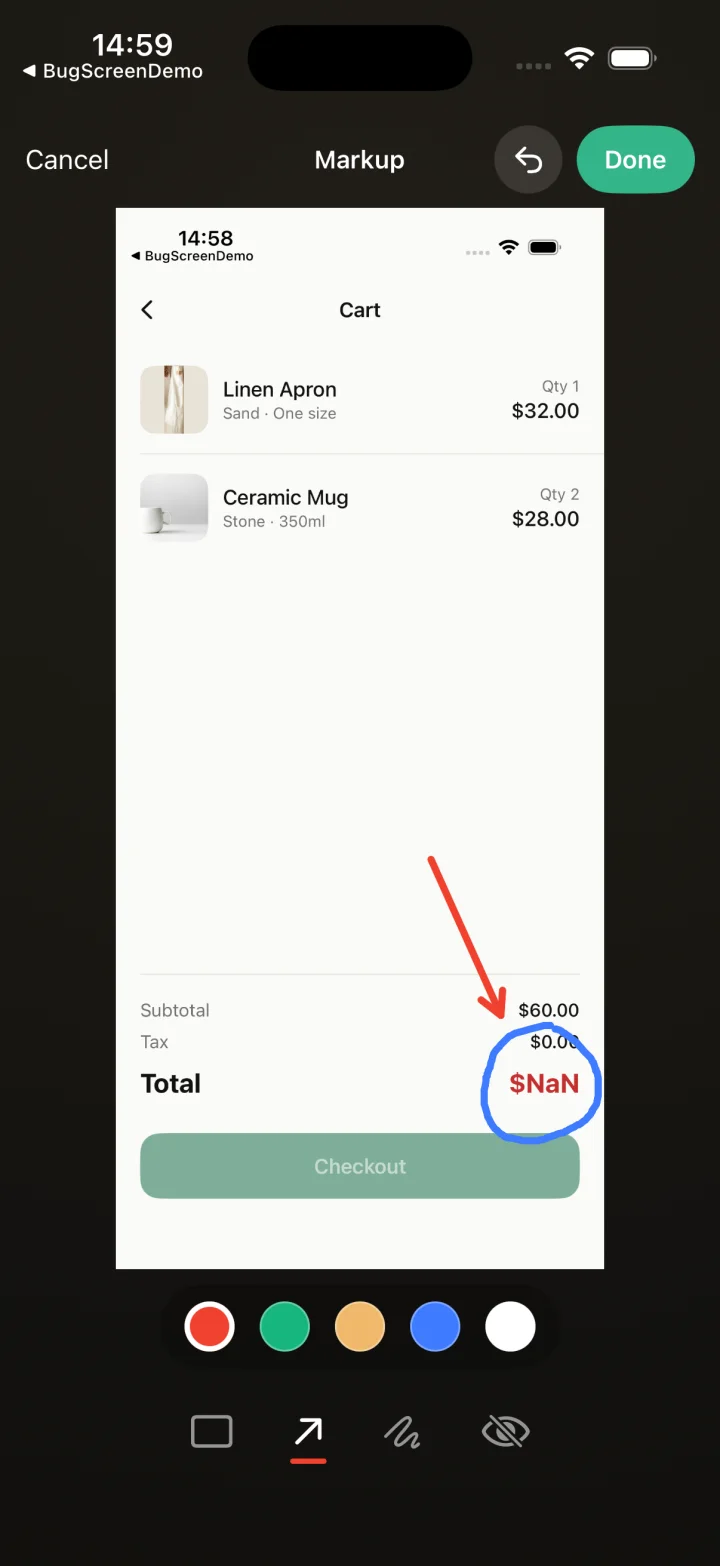
BugScreen detects the gesture, opens a native Compose / SwiftUI sheet, and asks for a short description.

screen_capture · 09:41:02BugScreen sheet presented
03

A developer-ready ticket is created

BugScreen automatically attaches logs, device details, app version, and reproduction context, files it in Jira, GitHub, or ClickUp, and posts it to Slack so the team sees it where they already talk.

acme/mobile · #1284● open
Login button unresponsive after entering credentials
Who it's for

Built for the people
filing the bugs.

BugScreen is built for the people who own pre-release quality on mobile — QA leads, mobile engineering leads, and stakeholders signing off a build. Distributed team? See how it kills the timezone round-trip.

QA leads

Stop closing bugs as “can’t reproduce.”

A screenshot is the trigger; BugScreen does the paperwork. Every report lands reproducible, so your testers stop re-testing bugs nobody could repro and start triaging real tickets.

  • No new app for testers to learn
  • Every report has device, OS, build, locale, and logs attached
  • Reports land in the same tracker your devs already use
  • Redaction happens on-device before upload
Built for shipping

Capture bugs.
Ship fixes.

BugScreen does one job: turn screenshots from your team into developer-ready tickets in the tracker you already use.

Focused

Just bug reports

For QA testers and teammates dogfooding the build — they turn a screenshot into a ticket, with logs and device context attached.

Developer-first

In your sprint, not a dashboard

Tickets land in the tracker your team already uses, with full metadata. No second-place inbox to babysit, no extra workflow to learn.

Native triggers

Screenshot is the signal

The OS screenshot gesture is the trigger. Zero friction for your team.

Full context

Everything attached

Device, OS, build, memory, locale, the last 200 lines of logs, network errors, and the screenshot itself.

Cross-platform

iOS & Android, live today

Native SDKs for iOS and Android, shipping now — same setup, same destination, one tracker. Web and other surfaces ship on request.

Quick setup

Up and running in minutes

Connect your tracker, copy an API key, drop the SDK in. Done.

The whole integration

Every screenshot becomes a bug report.

Your testers take screenshots like they always have. The SDK captures the moment, attaches the context — logs, device, build — and files a ticket your engineers can act on.

Android — Kotlin & Compose
iOS — Swift & SwiftUI
React Native — TypeScript
Web & more — on requestOn request
Application.kt
kotlin
// Application.onCreate
BugScreenSDK.start(
    BugScreenConfig.Builder(this)
        .apiKey("fb_your_api_key_here")
)
// That's it. Reports start flowing.
Privacy & security
Screenshots redacted on-device before uploadNo third-party trackers in the SDKLogs truncated to 200 lines, never PII-scrapedEU & US regions on request

Turn every screenshot into a fixable ticket.

Free to start — no credit card required.