Introducing BugScreen: better bug reports for mobile teams
BugScreen is an in-app bug reporter for mobile teams. When someone testing your app takes a screenshot, BugScreen opens a native reporting sheet, collects that screenshot along with logs and device context and files a ready-to-triage ticket straight into GitHub, Jira or ClickUp. Testers don’t fill in a long form, and developers don’t chase missing details — the report arrives complete, in the tools your team already uses.
Mobile bugs are hard enough to reproduce without every report starting with the same four questions: What device were you using? Which build was this? Can you send the logs? Do you have a screenshot? BugScreen answers all of them automatically.
What is BugScreen?
BugScreen is an in-app bug-reporting SDK for iOS, Android and React Native. When a tester takes a screenshot, BugScreen opens so they can file the issue — with logs and device context — straight into Jira, GitHub or ClickUp. It’s designed for QA teams, developers and teammates testing pre-release builds, not as another customer-feedback widget inside your production app. The goal is simple: make filing a useful mobile bug report almost as quick as noticing the bug itself.
How does screenshot-triggered bug reporting work?
A tester takes a screenshot, and BugScreen intercepts that event and opens a native reporting sheet. The tester adds a short description and can optionally choose a bug type and severity. BugScreen then collects the screenshot, recent logs, device and OS details, app version, locale, memory information and any custom data your app provides and files the completed report into your issue tracker. When a screenshot isn’t the right trigger, you can also open the reporter programmatically from anywhere in your app.
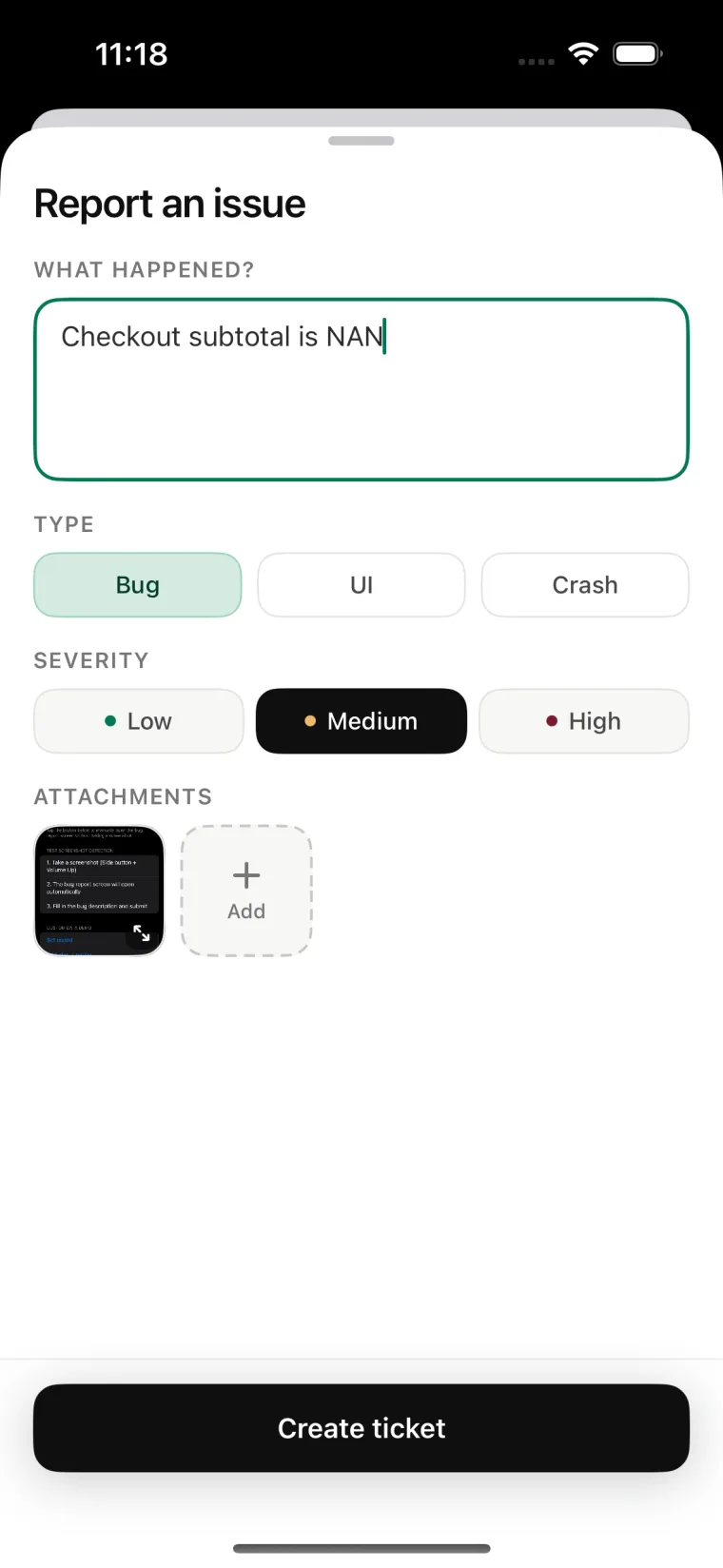
Which issue trackers does BugScreen file to?
BugScreen files reports directly into GitHub, Jira, ClickUp and Linear. When a report is submitted, it becomes an issue in your configured tracker with the screenshot and context attached, and BugScreen can also notify your team in Slack with links to the tickets it created. Where Report Inbox is enabled, a private copy remains available for 30 days. If one integration fails, BugScreen still delivers the report to the others and tells the tester what happened.
What information does BugScreen attach to every report?
Every report can include:
- One or more screenshots
- Recent application logs (up to ~1 MB, oldest dropped first)
- Device, OS, build, locale, and memory details
- Developer-supplied custom data
- A bug type and severity
Type and severity are translated into the appropriate labels, tags, or priorities in your tracker, so a report lands already categorised rather than as an undifferentiated note.
Which platforms does BugScreen support?
BugScreen ships SDKs for iOS (Swift), Android (Kotlin), and React Native. The reporting experience uses native SwiftUI and Jetpack Compose interfaces, and React Native apps inherit those same native reporters — so testers get a first-class experience on every platform without you building one.
Who is BugScreen for?
BugScreen is for QA teams, developers, and anyone testing pre-release mobile builds. Testers don’t need to install another app or learn a new workflow: they take a screenshot, describe what went wrong, and get back to testing. Developers receive a report with enough context to start investigating immediately. Every plan includes unlimited testers, so the whole team can report without counting seats.
How long does setup take?
Setup takes minutes. Connect your issue tracker, create an app in the BugScreen console, copy its API key, and initialize the SDK. That’s it — the next screenshot taken during testing can become a fully formed ticket.
Is BugScreen free?
BugScreen is free to start, with no credit card required. The Free plan includes one app, 50 reports per month, one integration, and unlimited testers. If your team spends too much time turning incomplete mobile bug reports into something developers can act on, give BugScreen a try.
Frequently asked questions
Does BugScreen work with React Native?
Yes. BugScreen ships a React Native SDK that bridges the native iOS and Android SDKs, so a React Native app gets the same native reporter and the same auto-collected context as a fully native app — with no separate per-platform configuration.
Does BugScreen replace my issue tracker?
No. BugScreen files into the tracker you already use. A completed report becomes an issue in GitHub, Jira, ClickUp or Linear. BugScreen can also post a Slack notification linking to the tickets it created. Where Report Inbox is enabled, BugScreen also keeps a private copy for 30 days so the team can inspect the original submission.
Do testers need a BugScreen account or a separate app?
No. Testers don’t install another app or sign in anywhere. They take a screenshot inside the build they’re already testing, add a short description and get back to testing. The reporter is part of your app via the SDK.
How is BugScreen different from an in-app feedback widget?
BugScreen is built for pre-release QA, not end-user feedback. It’s aimed at the people testing your app before it ships — QA, developers and teammates — and it attaches the technical context a developer needs to reproduce a bug, rather than collecting sentiment from customers in production.
What happens if one integration fails?
BugScreen still delivers the report to your other configured integrations and tells the tester what happened, so a single tracker outage never silently loses a bug report.
Is BugScreen free?
Yes, BugScreen is free to start with no credit card required. The Free plan includes one app, 50 reports per month, one integration and unlimited testers. Paid plans raise those limits.